




Many iPad users in 2026 still rely on old chargers and waste hours waiting for power. Sticking with a weak charging adapter means your iPad charges slowly. Modern iPad models already support rapid charging when you use the right USB‑C cable and iPad charger.
Smart charging habits keep your iPad ready for busy days at home or while traveling, quietly protecting performance. This guide explains methods and tips to improve iPad battery health and extend device longevity.

Step One: Check Your Port (USB‑C vs Lightning)
Step Two: Pick the Right Charger (PD Fast Charging & MacBook Compatibility)
Charging Methods: Which Method Works Best?
Battery Care: Is Overnight Charging Bad?
Recommended Setup: All‑in‑One Charging Station
Step One: Check Your Port (USB‑C vs Lightning)
Look at the charging port type before buying any new charger:
● USB‑C Models: Newer iPad Pro and other recent models feature a USB‑C charging port. These devices can take advantage of adapters up to 30W for the iPad Air and up to 60W for fast charging the iPad Pro.
● Lightning Models: Older Lightning connector iPads usually shipped with a 5W or 12W adapter (the 9th gen is an exception — it came with a 20W). Whether a PD charger helps depends on the model's support for it.

Why the Port Matters
Your port type ultimately determines which cables and adapters can deliver stable, higher‑speed power without compatibility issues. Understanding this upfront helps you avoid wasting money on accessories that are not compatible with your device.
Quick Tip
If you’re still using a USB-A to USB-C cable, consider switching to a USB-C to USB-C. It supports high-speed Power Delivery (PD), which can significantly improve charging speeds.
Also, don’t forget the cable matters as much as the charger—both need to support PD for fast charging on newer iPads
Step Two: Picking the High‑Wattage iPad Charger (USB‑C & PD)
Selecting the optimal charger for your iPad requires an understanding of key factors. Once these factors are clear, identifying a safe and efficient charger becomes straightforward.

Fast iPad Charger vs. MacBook Adapter: What’s the Difference?
1. Your iPad controls its power intake, not the charger’s output. This ensures safe and optimal charging regardless of the adapter's capacity.
2. Even a 100‑watt MacBook charger simply provides capacity; the iPad usually pulls around 20–40 watts (the M5 Pro can peak at 60W).
3. Apple documents confirm that high-power USB‑C adapters are acceptable and can reduce charging duration.
4. Using a single multi-device charging solution eliminates tangled cable clutter and the need for multiple charging bricks everywhere.
What PD and GaN Actually Do
Power Delivery allows the charger and iPad to automatically set a safe voltage and wattage. This prevents sudden spikes and keeps temperatures controlled without forcing unsafe currents. Gallium Nitride enables modern chargers to shrink in size while remaining efficient under heavier electrical loads. Compared with older silicon bricks, GaN designs waste less energy as heat and hold stable performance for longer.
One High‑Power Charger for Real Life
The 100W 6‑in‑1 Charging Station with MagSafe + CryoBoost by ESR uses GaN for high-power, efficient charging. It supports strong USB‑C PD charging for iPads and laptops. Lab tests show it can fully charge a MacBook Air M2 in about 90 minutes.

Charging Methods: Which Method Works Best?
Different charging setups work better in different situations, depending on how fast you need power. Now, we will compare the main methods to help you choose the right one to protect your iPad's battery health.
Wall Charging
Plugging your iPad into a strong PD wall charger delivers the fastest, most consistent charging for daily use. This method is best when you want a quick battery boost before class and long trips.
Charging via Computer
Using a computer’s USB port usually delivers very little power, so the battery charges very slowly. It is okay for small top‑ups while working, yet it should not be your main charging method.

Magic Keyboard Charging
If you use a Magic Keyboard, you can connect the charging cable to the side port. This charges your device and keeps the main USB‑C port free for other accessories you need.
When Your iPad Is Not Charging
If your iPad will not charge, check the cable and port. Follow this step‑by‑step guide for common fixes.
Charging Tips for Different iPad Models
Each iPad model features specific charging and efficiency characteristics. A thorough understanding of these ensures you select the most effective charger for consistent results.
1. iPad Pro 2025: 11‑inch M5 and 13‑inch M5
These Pro models are performance machines, so pair them with at least a 30W GaN iPad charger. High PD chargers help them charge even during heavy multitasking workloads. Avoid charging the iPad when it is covered to prevent heat from being trapped. High heat can cause thermal throttling and slow charging speeds. The iPad reduces power intake when it's hot to protect battery health.
2. iPad Air 2026: 11‑inch M5 and 13‑inch M5
Students and mobile workers often charge their iPad Air while taking notes. Once the tablet warms up, charging speed drops, and the device can feel slower. A better approach is to charge during breaks to let the device cool.

3. iPad (A16 chip) and iPad 10th Generation
These models may not match the Pro’s performance, yet they still benefit from a modern USB‑C charger for iPad and perform best with 20W–30W adapters. Stronger adapters instead of old 5/10W bricks make everyday charging faster. Keep them on hard surfaces while charging to prevent unnecessary thermal stress. Future models may adopt an A19 chip(iPad 12th Generation), so PD chargers will remain important.
4. iPad mini 7(iPad mini 8 aslo coming soon,stay tuned)
A small PD charger is great for reading and being productive on the move (up to ~20W). Do not charge in closed bags, as a lack of airflow increases temperatures and affects battery health.

Battery Care: Is Overnight Charging Bad?
Overnight charging is safe; your device’s system manages power for battery preservation. Adherence to proven charging habits also enhances routine charging speed and device reliability.
How to Handle Overnight Charging
When your iPad reaches a high charge, the system slows the current to avoid stressing the battery cells. Modern iPadOS versions include Optimized Charging, which automatically slows charging after 80% to extend battery health. Make sure it’s enabled under battery settings. Using the 80% charge limit helps reduce wear if you plug in for long periods, such as charging overnight.
Habits to Protect Battery Health
● Do not drain the battery to 0% regularly. Regularly draining to 0% puts stress on the battery cells and can speed up long-term capacity loss.
● Try to keep the charge level mostly between 20% and 80% during normal daily use.
● Avoid using or charging the device in places hotter than 35°C.
● Keep it away from heaters, parked cars in the sun, or windows with strong direct sunlight.
Recommended Setup: All‑in‑One Charging Station
If your desk is covered in random bricks and tangled cables, charging becomes a headache. Users waste time hunting for the right adapter and unplugging one device to make space to charge another. This messy setup makes it harder to stick to good charging habits.
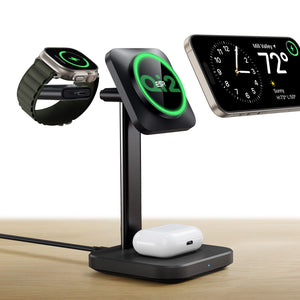
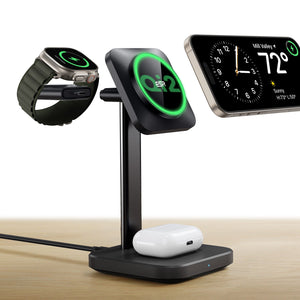
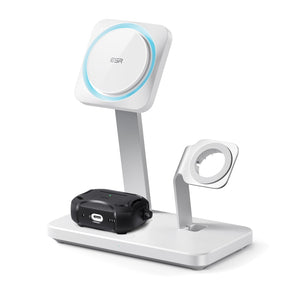
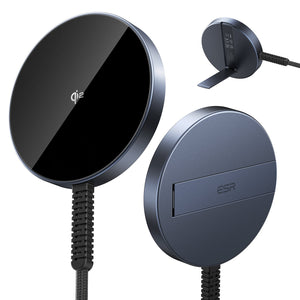
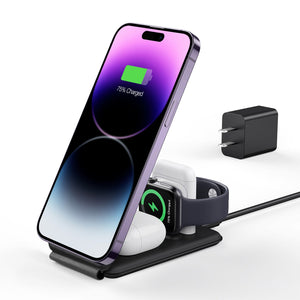
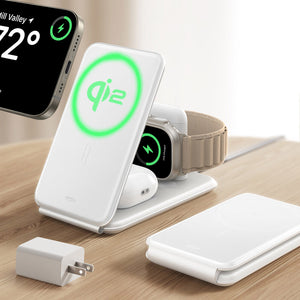
An all‑in‑one magnetic charging station is a strong, long‑term solution. Your iPad charges by cable, while your phone and earbuds charge magnetically. One compact charging hub replaces many small bricks and keeps your desk clean.
2026 Magnetic Charging Context
In 2026, iPads still rely on wired USB-C for fast charging, while magnetic charging continues to grow for phones and accessories. A good charging station can provide for both; it can hold and charge your phone magnetically while your iPad charges by cable.

Final Verdict
In summary, the right charging plan depends on your iPad model, your routine, and your patience level. With a good PD charger, smarter habits, and simple iPad battery health tips, you can cut wait times and keep performance steady for years. If you want a cleaner setup and reliable power across your devices, it’s worth checking out ESR accessories next.
What’s more, explore ESR’s iPad cases, keyboard cases, and protective accessories next!
You may also like to read:
1、DIY iPad Case Ideas: Pick the Right Color and Personalize Your Back-to-School Setup
2、ESR Shift Magnetic Case Review: The Best Fridge‑Mount iPad Air 11‑ and 13‑Inch Case for 2026
3、Can You Really Use a USB or Mechanical Keyboard with Your iPad?
4、How to Charge iPad Without Charger?
5、iPad Charging Slow? 13 Quick Fixes!
6、Is It Safe to Fast Charge Your iPad? Don’t Worry! It Doesn’t Hurt!