
We regret to inform you that due to business adjustments, ESR will cease online sales in your area.
Cart 0
  • Designed for MagSafe
    • All MagSafe Products
      • Wireless Charging
      • Car Charger & Mounts
      • Charging Stands
      • MagSafe Cases
      • MagSafe Wallets
      • Power Banks
      • MagSafe Rings & Wall Mounts
      • Best MagSafe Bundles
    • Magsafe in Life
      • Desk Charging
      • Shop Auto
      • Travel Essentials
      • Workspace Power
      • Find My Technology
      • Gift Guide
  • Protection By Device
    • All Cases
      • iPhone
      • iPad🔥
      • Airpods
      • Samsung
    • Screen Protection
      • iPhone
      • iPad🔥
      • Apple Watch & Airtag
      • Samsung
      • For Tesla
    • iPad Productivity
      • Keyboards🔥
      • Styluses
    • Accessories
      • All Accessories
      • iPhone 16
      • iPhone 16e🔥
      • iPhone 16 Pro Max
      • iPhone 16 Pro
      • iPhone 16 Plus
      • iPhone 16
      • iPhone 15
      • iPhone 15 Pro Max
      • iPhone 15 Pro
      • iPhone 15 Plus
      • iPhone 15
      • iPhone 14
      • iPhone 14 Pro Max
      • iPhone 14 Pro
      • iPhone 14 Plus
      • iPhone 14
      • iPhone 13
      • iPhone 13 Pro Max
      • iPhone 13 Pro
      • iPhone 13
      • Other iPhone Series
      • Other iPhone Series
        Choose Your Device
      • iPad 11th Gen (2025)🔥
      • iPad Air 13 (2025)🔥
      • iPad Air 11 (2025)🔥
      •  
      • iPad Pro 13 (2024)
      • iPad Pro 11 (2024)
      • iPad Air 13 (2024)
      • iPad Air 11 (2024)
      • iPad mini 7 (2024)
      •  
      • iPad Pro 12.9 (2022)
      • iPad Pro 11 (2022)
      • iPad Air 5/4 (2022)
      • iPad 10th Gen (2022)
      •  
      • iPad mini 6 (2021)
      • iPad Pro 12.9 (2021)
      • iPad Pro 11 (2021)
      • iPad Pro 11 (2020)
        Choose Your Device
      • AirPods 4
      • AirPods Pro (2023/2022/2019)
      • AirPods 3
        Galaxy S25
      • Galaxy S25 Ultra
      • Galaxy S25+
      • Galaxy S24
      • Galaxy S24 Ultra
      • Galaxy S24+
      • Galaxy S24
      • Galaxy S23
      • Galaxy S23 Ultra
      • Galaxy S23
        iPhone 16
      • iPhone 16e🔥
      • iPhone 16 Pro Max
      • iPhone 16 Pro
      • iPhone 16 Plus
      • iPhone 16
      • iPhone 15
      • iPhone 15 Pro Max
      • iPhone 15 Pro
      • iPhone 15 Plus
      • iPhone 15
      • iPhone 14
      • iPhone 14 Pro Max
      • iPhone 14 Pro
      • iPhone 14 Plus
      • iPhone 14
      • iPhone 13
      • iPhone 13 Pro Max
      • iPhone 13/13 Pro
        Choose Your Device
      • iPad 11th Gen (2025)🔥
      • iPad Air 13 (2025)🔥
      • iPad Air 11 (2025)🔥
      •  
      • iPad Pro 13 (2024)
      • iPad Pro 11 (2024)
      • iPad Air 13 (2024)
      • iPad Air 11 (2024)
      •  
      • iPad Pro 12.9 (6th/5th/4th/3rd Gen)
      • iPad Pro 11 (4th/3rd/2nd/1st Gen)
      • iPad Air 5/4 (2022)
      • iPad 10th Gen (2022)
      •  
         
      • Apple Watch & Airtag
        Galaxy S25
      • Galaxy S25 Ultra
      • Galaxy S24
      • Galaxy S24 Ultra
      • Galaxy S23
      • Galaxy S23 Ultra
      • Galaxy S23+
      • Galaxy S23
      • Galaxy S22
      • Galaxy S22 Ultra
      • Other Samsung Series
      • Galaxy S21+
      • Galaxy S21
         
      • Tesla Tempered-Glass Touchscreen Protector
        Choose Your Device
      • iPad 11th Gen (2025)🔥
      • iPad Air 13 (2025)🔥
      • iPad Air 11 (2025)🔥
      •  
      • iPad Pro 13 (2024)
      • iPad Pro 11 (2024)
      • iPad Air 13 (2024)
      • iPad Air 11 (2024)
      •  
      • iPad Pro 12.9 (6th/5th/4th/3rd)
      • iPad Pro 11 (4th/3rd/2nd/1st)
      • iPad Air 5/4 (2022)
      • iPad 10th Gen (2022)
         
      • Styluses
         
      • Magnetic Wallet
      • MagSafe Rings & Mounts
      • Other Accessories
  • New Arrival
    • iPad 2025 Series
    • iPhone 16e
    • Galaxy S25 Series
    • Protect Your iPhone 16 Camera Control Button
    • 15W Qi2 Wireless Charging
  • Support
    • Product Videos & FAQs
    • General FAQ
  • Explore
    • About Us
    • ESR Blog
    • Newsroom
    • Become a Reseller
My Account
Log in Register
English
  • Designed for MagSafe
    • All MagSafe Products
      • Wireless Charging
      • Car Charger & Mounts
      • Charging Stands
      • MagSafe Cases
      • MagSafe Wallets
      • Power Banks
      • MagSafe Rings & Wall Mounts
      • Best MagSafe Bundles
    • Magsafe in Life
      • Desk Charging
      • Shop Auto
      • Travel Essentials
      • Workspace Power
      • Find My Technology
      • Gift Guide
    • Wireless Charging
      • Portable Charger for Apple Watch - White

      • Qi2 3-in-1 Watch Wireless Charging Set (HaloLock) - Black - US PLUG

      • Magnetic Wireless Car Charger (HaloLock) - Grey

      • Universal Ring 360 (HaloLock) - White-2 Pack

      • All Wireless Charging >
      Car Charger & Mounts
      • Qi2 Wireless Car Charger with CryoBoost (HaloLock) - Black

      • Qi2 Magnetic Wireless Car Charger(Halolock) - Black

      • 15W Car Charger with MagSafe + CryoBoost - Cool Grey

      • Qi2 Dashboard Wireless Car Charger (HaloLock) - Black

      • All Car Charger & Mounts >
      Charging Stands
      • Qi2 3-in-1 Watch Wireless Charging Set (HaloLock) - Black - EU PLUG

      • CryoBoost™ Pro Bundle (HaloLock) - US Plug

      • MagSafe Charger with CryoBoost Everyday Bundle - EU Plug

      • Magsafe Charger One-Stop Bundle - Black/White

      • All Charging Stands >
      MagSafe Cases
      • iPhone 16 Pro Max Cyber Tough Case with Stash Stand Privacy Protection Bundle - Black

      • iPhone 16 Pro Max HaloLock Classic Hybrid Case (Camera Control) - Clear

      • iPhone 16 Pro Max HaloLock Classic Hybrid Case (Camera Control, Stash Stand) - Clear

      • iPhone 16 Pro Max Zero Clear Case (HaloLock) - Clear

      • All MagSafe Cases >
      MagSafe Wallets
      • Geo Wallet Stand (HaloLock) with Built-in Find My - Midnight Black

      • Geo Wallet Boost (HaloLock) - Grey

      • Magnetic Wallet Boost (HaloLock) - Black

      • Grip Wallet Stand (HaloLock) - Black Carbon Fiber

      • All MagSafe Wallets >
      Power Banks
      • Qi2 MagSlim Kickstand Power Bank (10K) - Black

      • Qi2 MagSlim Power Bank (5K) - Black

      • Qi2 MagSlim Power Bank (10K) - Blue

      • Qi2 5,000 mAh MagSlim Kickstand Power Bank - White

      • All Power Banks >
      MagSafe Rings & Wall Mounts
      • Airplane Phone Holder Mount (HaloLock) - Black

      • Ring Stand (HaloLock) - Sierra Blue

      • Universal Ring (HaloLock) - Black/Silver-4 Pack

      • Universal Ring 360 (HaloLock) - White-2 Pack

      • All MagSafe Rings & Wall Mounts >
      Best MagSafe Bundles
      • CryoBoost™ Pro Bundle (HaloLock) - US Plug

      • Orbit Hybrid Everyday-Carry Bundle for AirPods Pro (2023/2022/2019) - Blue

      • Orbit Hybrid Everyday-Carry Bundle for AirPods Pro (2023/2022/2019) - Purple

      • Orbit Hybrid Everyday-Carry Bundle for AirPods Pro (2023/2022/2019) - Pink

      • All Best MagSafe Bundles >
      Desk Charging
      • Qi2 mini Kickstand Wireless Charger (HaloLock) - Dark Blue

      • CryoBoost™ Pro Bundle (HaloLock) - US Plug

      • Kickstand MagSafe Compatible Wireless Charger (HaloLock) - Black

      • HaloLock™ 3-in-1 Travel Wireless Charging Set - Black - US Plug

      • All Desk Charging >
      Shop Auto
      • Qi2 Wireless Car Charger with CryoBoost (HaloLock) - Black

      • Qi2 Magnetic Wireless Car Charger(Halolock) - Black

      • 15W Car Charger with MagSafe + CryoBoost - Cool Grey

      • Qi2 Dashboard Wireless Car Charger (HaloLock) - Black

      • All Shop Auto >
      Travel Essentials
      • HaloLock™ 3-in-1 Travel Wireless Charging Set - Black - US Plug

      • 5,000mAh Power Bank Wallet (HaloLock) - Midnight Black

      • Qi2 MagSlim Kickstand Power Bank (10K) - Black

      • Airplane Phone Holder Mount (HaloLock) - Black

      • All Travel Essentials >
      Workspace Power
      • iPad 10th Generation Rebound Magnetic Keyboard Case - US Layout-Black

      • iPad Pro 12.9ʺ Ascend Tastatur Hülle Lite - DE Layout-Black

      • iPad Pro 12.9ʺ Ascend Keyboard Case Lite - US Layout-Black

      • iPad 10. Generation Ascend Tastatur Hülle Lite - DE Layout

      • All Workspace Power >
      Find My Technology
      • Geo Wallet Stand (HaloLock) with Built-in Find My - Midnight Black

      • Geo Wallet Boost (HaloLock) - Grey

      • Geo Digital Pencil with Built-in Find My - White

      • All Find My Technology >
      Gift Guide
      • Geo Wallet Boost (HaloLock) - Brown

      • Qi2 3-in-1 Travel Wireless Charging Set - White - US Plug

      • Qi2 MagSlim Power Bank (10K) - Blue

      • AirPods 4 Cyber FlickLock Case (HaloLock) - Titanium

      • All Gift Guide >
  • Protection By Device
    • All Cases
      • iPhone
      • iPad🔥
      • Airpods
      • Samsung
    • Screen Protection
      • iPhone
      • iPad🔥
      • Apple Watch & Airtag
      • Samsung
      • For Tesla
    • iPad Productivity
      • Keyboards🔥
      • Styluses
    • Accessories
      • All Accessories
      • iPhone 16
      • iPhone 16e🔥
      • iPhone 16 Pro Max
      • iPhone 16 Pro
      • iPhone 16 Plus
      • iPhone 16
      • iPhone 15
      • iPhone 15 Pro Max
      • iPhone 15 Pro
      • iPhone 15 Plus
      • iPhone 15
      • iPhone 14
      • iPhone 14 Pro Max
      • iPhone 14 Pro
      • iPhone 14 Plus
      • iPhone 14
      • iPhone 13
      • iPhone 13 Pro Max
      • iPhone 13 Pro
      • iPhone 13
      • Other iPhone Series
      • Other iPhone Series
        Choose Your Device
      • iPad 11th Gen (2025)🔥
      • iPad Air 13 (2025)🔥
      • iPad Air 11 (2025)🔥
      •  
      • iPad Pro 13 (2024)
      • iPad Pro 11 (2024)
      • iPad Air 13 (2024)
      • iPad Air 11 (2024)
      • iPad mini 7 (2024)
      •  
      • iPad Pro 12.9 (2022)
      • iPad Pro 11 (2022)
      • iPad Air 5/4 (2022)
      • iPad 10th Gen (2022)
      •  
      • iPad mini 6 (2021)
      • iPad Pro 12.9 (2021)
      • iPad Pro 11 (2021)
      • iPad Pro 11 (2020)
        Choose Your Device
      • AirPods 4
      • AirPods Pro (2023/2022/2019)
      • AirPods 3
        Galaxy S25
      • Galaxy S25 Ultra
      • Galaxy S25+
      • Galaxy S24
      • Galaxy S24 Ultra
      • Galaxy S24+
      • Galaxy S24
      • Galaxy S23
      • Galaxy S23 Ultra
      • Galaxy S23
        iPhone 16
      • iPhone 16e🔥
      • iPhone 16 Pro Max
      • iPhone 16 Pro
      • iPhone 16 Plus
      • iPhone 16
      • iPhone 15
      • iPhone 15 Pro Max
      • iPhone 15 Pro
      • iPhone 15 Plus
      • iPhone 15
      • iPhone 14
      • iPhone 14 Pro Max
      • iPhone 14 Pro
      • iPhone 14 Plus
      • iPhone 14
      • iPhone 13
      • iPhone 13 Pro Max
      • iPhone 13/13 Pro
        Choose Your Device
      • iPad 11th Gen (2025)🔥
      • iPad Air 13 (2025)🔥
      • iPad Air 11 (2025)🔥
      •  
      • iPad Pro 13 (2024)
      • iPad Pro 11 (2024)
      • iPad Air 13 (2024)
      • iPad Air 11 (2024)
      •  
      • iPad Pro 12.9 (6th/5th/4th/3rd Gen)
      • iPad Pro 11 (4th/3rd/2nd/1st Gen)
      • iPad Air 5/4 (2022)
      • iPad 10th Gen (2022)
      •  
         
      • Apple Watch & Airtag
        Galaxy S25
      • Galaxy S25 Ultra
      • Galaxy S24
      • Galaxy S24 Ultra
      • Galaxy S23
      • Galaxy S23 Ultra
      • Galaxy S23+
      • Galaxy S23
      • Galaxy S22
      • Galaxy S22 Ultra
      • Other Samsung Series
      • Galaxy S21+
      • Galaxy S21
         
      • Tesla Tempered-Glass Touchscreen Protector
        Choose Your Device
      • iPad 11th Gen (2025)🔥
      • iPad Air 13 (2025)🔥
      • iPad Air 11 (2025)🔥
      •  
      • iPad Pro 13 (2024)
      • iPad Pro 11 (2024)
      • iPad Air 13 (2024)
      • iPad Air 11 (2024)
      •  
      • iPad Pro 12.9 (6th/5th/4th/3rd)
      • iPad Pro 11 (4th/3rd/2nd/1st)
      • iPad Air 5/4 (2022)
      • iPad 10th Gen (2022)
         
      • Styluses
         
      • Magnetic Wallet
      • MagSafe Rings & Mounts
      • Other Accessories
  • New Arrival
    • iPad 2025 Series
    • iPhone 16e
    • Galaxy S25 Series
    • Protect Your iPhone 16 Camera Control Button
    • 15W Qi2 Wireless Charging
  • Support
    • Product Videos & FAQs
    • General FAQ
  • Explore
    • About Us
    • ESR Blog
    • Newsroom
    • Become a Reseller
Account Cart 0
English

Search our store

Account Cart 0
Popular Searches:
iPad 2025 iPhone 16 camera control Qi2 Wireless Charging Magnetic Wallet
How To

How to Find Your Lost Wallet: From Old-School Solutions to the Modern Fix

by Adam on Jan 12, 2026
esr find-my magsafe wallet:never worry about the lost your wallet

It happens to everybody. You reach for your wallet, and it's just... gone. No note, no explanation—just a sick feeling in your stomach and the start of what's probably going to be a really bad day. Your credit cards, your ID, that cash you withdrew yesterday—all of it has vanished, and you have no idea where to even start looking.

That panic is real. But here's the thing: losing a wallet doesn't have to be a disaster. In this guide, we're going to walk you through the practical, no-nonsense ways to actually find your wallet when it disappears. And then, we'll talk about a genuinely game-changing modern solution that's basically put an end to this whole problem for a lot of people—MagSafe wallets with Apple Find My tracking built right in.

esr find-my magsafe wallet:never worry about the lost your wallet

The Classic Approach: Six Ways to Locate Your Wallet

The Modern Solution: MagSafe Wallets and the End of Lost Wallet Anxiety

What's a MagSafe Wallet, Anyway?

Real People, Real Situations

What About Damage? Is the Magnet Safe?

Conclusion

The Classic Approach: Six Ways to Locate Your Wallet

Step 1: Stop and Breathe

Seriously. When you first realize your wallet's missing, your brain goes into overdrive. You start mentally retracing your steps, you might actually start sweating, and suddenly you're tearing through your car, your couch, everywhere at once. This is exactly the wrong move.
Before you do anything, take thirty seconds and get your head right. 

Use the 4-4-4 breathing method—the same technique Navy SEALs use to manage stress. Here's how it works: exhale slowly through your nose for a count of four. Hold it for four. Then breathe in through your nose for four. Do that a few times, and you'll actually feel the panic start to lift. Your mind clears. Your focus sharpens. And then—and only then—you start looking.

Step 2: Think About Context, Not Location

Here's where most people screw up. They ask themselves, "Where did I last see my wallet?" And the answer is usually... nowhere helpful. Of course, you don't remember the exact spot—you weren't actively thinking about your wallet. You were doing other stuff.
Instead, ask yourself: What was I wearing yesterday? Which jacket? Which pants? Which backpack? Those are the things your brain actually tracked. Your memory is way better at locations-as-part-of-a-scene than it is at remembering random objects. So think back. You wore that blue jacket to work, right? Check the pockets. You brought your gym bag to the office? Check the bottom of that bag. This approach works because you're triggering memory through context, not through abstract recall.

Step 3: Start With the Most Likely Spots

Now that you're calm and thinking straight, don't ransack the whole house. Be strategic. Where do you usually keep your wallet? On your dresser? In your car's center console? In your desk drawer at work? Start there. Check those places first—carefully, not frantically.
If you normally keep your wallet in one spot and it's not there, move on to the runner-up locations. You left it at a coffee shop yesterday? Call them. You think it might've fallen out at the gym? The gym has a lost and found. This approach saves time because you're not searching everywhere; you're searching smart.

Step 4: Search Methodically—Don't Destroy Everything

If the obvious places didn't pan out, it's time to go deeper. Pick one room and start a systematic search. Move couch cushions. Check under throw pillows. Look under anything that could be lying on top of your wallet. But—and this is important—do this carefully. Don't flip your entire house upside down like you're angry at it. If you do that and still don't find it, you've now got a wrecked apartment and no wallet.
The key here is thoroughness without chaos. It's slow and deliberate. You're looking for something small, so you need to actually pay attention to what you're seeing. Most lost wallets don't disappear into thin air—they end up in the weirdest places. Wedged between couch cushions. Under a pile of laundry you forgot about. At the bottom of a bag you don't use often. The wallet's there somewhere. You just have to actually look.

Step 5: Call Around

If it's not at home, at work, or in your car, then it's probably at wherever you last actually used it. A restaurant. A bar. A store. Wherever you pulled it out and handed it over.
Pick up the phone and call. Yes, you have to actually talk to someone. Most places are too busy to call you back, so you're gonna have to make the call. But here's the thing: most people are honest. If a server finds your wallet at a restaurant, there's a decent chance it's sitting in their lost and found right now. I've had that happen to me in New York—left my wallet at a bar in the East Village, called back the next morning, and yeah, the bartender had it. It happens more often than you'd think.

Step 6: Make It a System

Okay, so you found your wallet. Or maybe you got lucky, and someone handed it back to you. Either way, the best way to never lose it again is to stop treating it like a random object that just... exists somewhere.

From now on, your wallet lives in one place. The same place every single day. And here's a pro tip: put it with your keys. Your wallet and your keys are basically best friends—they want to be together. When you go out, you grab your keys automatically. Your wallet is right there, so you grab it too. Your brain creates a pattern. After a couple of weeks, this becomes automatic. You won't even think about it anymore. You'll just reach for your keys, and your wallet comes with it.

This sounds almost stupidly simple, but the consistency is what makes it work. Your muscle memory does the heavy lifting. And then losing your wallet becomes something that just... doesn't happen anymore.

The Modern Solution: MagSafe Wallets and the End of Lost Wallet Anxiety

Look, those steps work. I'm not going to sit here and tell you they don't. Millions of people have found their wallets using that exact approach. But here's the thing: they're all fixes that come after the wallet is already lost. What if there was a way to basically make it impossible for your wallet to get lost in the first place?

That's where MagSafe wallets come in. And honestly, this technology is legitimately a game-changer.

What's a MagSafe Wallet, Anyway?

A MagSafe wallet is pretty straightforward. It's a thin card holder with built-in magnets that snaps directly onto the back of your iPhone 12 or newer (or onto any MagSafe-compatible case). Your wallet is now physically attached to your phone.

Think about that for a second. Your phone is probably the one thing you literally never leave without. You'd notice immediately if your phone was gone. But how many times have you walked out the door without your wallet and not realized it until later? Maybe you left it in a restaurant two hours away. Maybe it fell out of your pocket at the store.
But if your wallet is stuck to your phone? That problem basically evaporates. You're not gonna leave your phone behind. So your wallet doesn't leave either.

The Practical Benefits: Space and Weight

Beyond just not losing it, there's another real advantage that people don't always appreciate: your wallet stops taking up space.

Traditional wallets are thick. They bulge. You sit down, and there's this uncomfortable hunk of leather in your back pocket. If you're a guy, you're literally sitting on your wallet, which isn't great for your spine. If you're carrying one in a bag, it takes up real estate that could be used for something else.

A MagSafe wallet? It's maybe the size of a credit card holder. It sticks to the back of your phone. Your pockets are actually empty now. You're carrying less. For someone who travels a lot, this is honestly huge. You're saving space in your bag. You're not dealing with wallet bulk. And yeah, it sounds trivial, but when you're traveling, and every ounce matters, it actually makes a difference.

Find My: The Real Magic

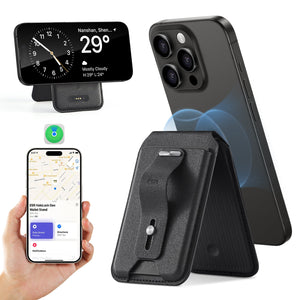
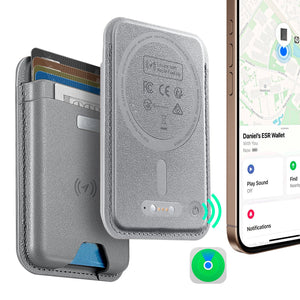
But here's where it gets really good. A lot of these MagSafe wallets now come with built-in Apple Find My tracking.

esr find-my phone wallet find-my function start method

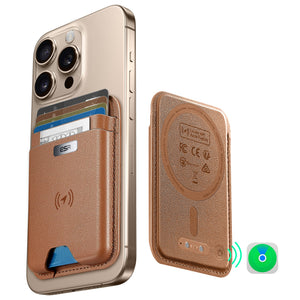
So what does that actually mean? Once you register your wallet in the Find My app, it works basically like an AirTag. When your wallet is within range of your phone (roughly 150 feet or so), you can make it play a sound through the app, and boom—you just found it. Got any idea where it could be? Hit the sound button and listen.

But what if it's further away? What if you actually lose the connection? That's when the network kicks in. Find My will show you the last location where your wallet was detected, and it's pulling that data from a network of hundreds of millions of Apple devices. Basically, when your wallet goes missing and passes near any other Apple user, their device anonymously logs the location. You see that on your map. You know where to start looking.

And here's the thing that people sometimes don't realize: when someone finds something with a Find My tag on it, a lot of times they'll actually try to help. They'll scan the tag, see the contact info, and reach out. It's like the whole internet becomes your lost and found department.

Real People, Real Situations

Let me give you some actual examples of how this plays out, because the concept is one thing—the real-world benefit is another.

Jack's Story: The Business Traveler

Jack's a consultant. He's in a different city three weeks out of every month. Before he switched to a MagSafe wallet, he had this constant, gnawing anxiety about his wallet when he traveled. He'd check his pocket obsessively at the airport, at the hotel, at client meetings. One time, he actually left his wallet at security during a check-in. The TSA agent found it, but man—that was the moment Jack realized something had to change.

Six months ago, Jack got a MagSafe wallet and attached it to his iPhone. He's traveled to maybe fifteen different cities since then. He hasn't given his wallet a second thought. Not once. Because his phone is the one thing he never loses. His wallet is just... attached to his phone now. Problem solved.

Ella's Situation: The Absent-Minded Type

Ella's a designer. She works from various coffee shops around Brooklyn, meetings in different offices, co-working spaces, you name it. She lost her wallet five times last year. Five times. In one year. Sometimes at a cafe, sometimes at an office, once she even left it at the gym and didn't notice until she got home.

She got frustrated enough to try a MagSafe setup. Within the first week, she actually did misplace her wallet—left it at a coffee shop downtown. But instead of spending an hour calling around and freaking out, she just opened Find My on her phone, saw exactly where the wallet was, and walked over to grab it. The app literally pinpointed the coffee shop. She got there, it was still there, and she was back to work in fifteen minutes.

Now she says she doesn't even worry about it anymore. The wallet is always where her phone is, and on the rare occasion it's not, Find My tells her exactly where to go.

Marcus's Travel Experience

Marcus and his wife were planning a two-week trip through Europe. Marcus usually travels with a full wallet—cash from multiple countries, credit cards, all of it. A lot of moving parts. A lot of stuff to lose.

This time, he decided to try something different. He got a MagSafe wallet, synced it to Find My, and decided he'd carry just what he actually needed: one credit card, his ID, and some euros. His wife did the same thing. Suddenly, they're traveling with basically nothing in terms of physical wallets. They had more space in their bags. They were less paranoid about getting robbed. And Marcus actually shared his wallet's Find My location with his wife through the app, so if he somehow did manage to lose it, she could technically help him track it down.

That sounds paranoid, maybe, but it actually kind of illustrates the point. With Find My on a MagSafe wallet, losing your wallet isn't actually a realistic scenario anymore. It's just not.

What About Damage? Is the Magnet Safe?

One thing people worry about: will the magnet screw up my credit cards? The answer is no. MagSafe technology is specifically engineered for iPhones. The magnets are positioned and calibrated so they won't interfere with magnetic strips or chip readers. And actually, a lot of these wallets include RFID blocking too, which adds a layer of security against unauthorized card scanning.

So yeah, you can trust the tech. It works.

Choosing the Right Wallet

There are a bunch of options out there. ESR makes several MagSafe wallet options with Find My integration. There are minimalist card holders if you only carry three or four cards. There are wallets that hold more if you're not ready to go full minimalist yet. Some even have a built-in phone stand, so you can prop your phone up while you're watching videos or on a FaceTime call.

The best part? All the decent ones are Apple-certified, which means they've been tested for compatibility and quality. You're not taking a risk. Pick whichever style matches what you actually need, and you're good to go.

Who Should Actually Do This?

MagSafe wallets aren't necessarily for everyone, but they're perfect for a pretty specific set of people:
● People who lose things constantly. Find My is basically your safety net.
● Frequent travelers. Space savings matter. Peace of mind matters more.
● Minimalists. If you've been trying to simplify your life, this is a concrete way to do it.
● Modern city people in a cashless world. You probably don't need a traditional wallet anyway. A few cards and your phone is probably enough.

Bringing It All Together

Remeber the traditional steps for finding a lost wallet. They're still relevant. You'll probably use them at some point in your life. Maybe for a wallet, maybe for something else.
But if you're using an iPhone 12 or newer, making the switch to a MagSafe wallet with Find My is actually the smarter move. It's not even close. You're not just getting a place to hold your cards. You're getting security, you're saving space, and you're eliminating an entire category of stress from your life.

It's one of those rare cases where technology actually just... solves a problem. Cleanly. No complicated workarounds. No asterisks. You attach your wallet to your phone, and then you stop losing your wallet. That's it.

Conclusion

Losing your wallet used to mean a day of panic, phone calls, and hoping someone honest found it. Maybe you'd get lucky. Maybe you wouldn't.

Now you've got options. You can remember the breathing techniques, the context method, the systematic search—and honestly, knowing those things is always useful. Or you can just invest forty or fifty bucks in a MagSafe wallet with Find My(like esr Geo Magnetic Wallet Stand (Grip) ), stick it to your phone, and put the whole problem behind you.

For what it's worth, most people who make the switch never go back. They wonder why they waited so long. The wallet stays attached to the phone, the phone never leaves their side, and suddenly they've got one less thing to stress about. In a world where stress seems to come from everywhere, that's actually pretty valuable.

Get a MagSafe wallet. Check out what ESR and other brands have available. Pick one that fits your style. Then stop worrying about losing your wallet ever again.
Because honestly? That anxiety isn't worth it.

Tags: find my, MagSafe, magsafe wallet
Previous
How to Solve iPad Battery Draining Fast - 10 Fixes You Should Know

Related Articles

10 Fixes to Solve iPad Battery Draining Fast

How to Solve iPad Battery Draining Fast - 10 Fixes You Should Know

keep iPhone Battery health

The Great Wireless Charging Debate: Is It Really Harming Your iPhone Battery?

Why Keyboard Cases matter for College Students?

The Ultimate Student Guide to Choosing the Best iPad Pro Keyboard Case for College

Leave a Comment

Your email address will not be published.

Recent Post

ESR’s Top 10 Best-Selling Products of 2025
ESR’s Top 10 Best-Selling Products of 2025: Your Buying Guide for 2026
by Carolin on February 08, 2026
esr anti-yellowing clear tpu case line
What is a TPU Phone Case? ESR's Model Tested for Protection & Clarity
by Javeria Salam on November 04, 2025
The best iPad Pro cases of 2025: Expert tested and reviewed
Which iPad Pro 13 Case is good for you : Zugu vs. Moft vs. ESR
by Adam on September 16, 2025
Best Cases for iPhone 17
Best Cases for iPhone 17: Which Wins— OtterBox, ESR, Apple, or Casetify?
by Nicky on September 28, 2025
best 5 magsafe iphone 17 cases
Looking for Custom iPhone Cases for New iPhone - Top 4 Options
by Carolin on September 23, 2025
6-best-iPad-Air-11-inch-Cases-With-Pencil-Holder-in-2025
6 best iPad Air 11-inch Cases With Pencil-Holder in 2025
by Sandy on April 16, 2025

Get 20% off with code: BLOG20

Company

  • About Us
  • Our Blog
  • Newsroom
  • Become a Reseller

Products

  • Designed for MagSafe
  • Protective Phone Cases
  • iPad Cases
  • Screen Protectors
  • Wireless Charging
  • Productivity
  • Magnetic Wallets
  • Other Accessories

Community

  • Affiliate Program

Support

  • Setup Videos & FAQs
  • Return and Refund
  • Warranty Policy
  • Shipping Policy

Get 10% OFF Your First Order

Get insider access to new products and promotions.

Payment options:
  • American Express
  • Apple Pay
  • Google Pay
  • Mastercard
  • PayPal
  • Shop Pay
  • Union Pay
  • Visa
  • Klarna Klarna
  • Afterpay
© 2025 ESR All rights reserved.
  • Terms of Use
  • Privacy Policy
  • Legal Declaration
  • Cookie Policy
  • Shipping Policy
  • Return and Refund
  • Do not sell or share my personal information
  • Search

Shopping Cart

Your cart is currently empty.
Add note for seller
Estimate shipping rates
Add a discount code
Subtotal ¥0.00
View Cart

Thank you for choosing to transfer to a human service.

Sorry! The previous responses were from our AI customer service. Since it didn't satisfy you, you've been transferred to a human agent. We'll reply within 24 hours from Mon to Fri and 48 hours on weekends for further help.

Please select the reason for transfer