
We regret to inform you that due to business adjustments, ESR will cease online sales in your area.
Cart 0
  • Designed for MagSafe
    • All MagSafe Products
      • Wireless Charging
      • Car Charger & Mounts
      • Charging Stands
      • MagSafe Cases
      • MagSafe Wallets
      • Power Banks
      • MagSafe Rings & Wall Mounts
      • Best MagSafe Bundles
    • Magsafe in Life
      • Desk Charging
      • Shop Auto
      • Travel Essentials
      • Workspace Power
      • Find My Technology
      • Gift Guide
  • Protection By Device
    • All Cases
      • iPhone
      • iPad🔥
      • Airpods
      • Samsung
    • Screen Protection
      • iPhone
      • iPad🔥
      • Apple Watch & Airtag
      • Samsung
      • For Tesla
    • iPad Productivity
      • Keyboards🔥
      • Styluses
    • Accessories
      • All Accessories
      • iPhone 16
      • iPhone 16e🔥
      • iPhone 16 Pro Max
      • iPhone 16 Pro
      • iPhone 16 Plus
      • iPhone 16
      • iPhone 15
      • iPhone 15 Pro Max
      • iPhone 15 Pro
      • iPhone 15 Plus
      • iPhone 15
      • iPhone 14
      • iPhone 14 Pro Max
      • iPhone 14 Pro
      • iPhone 14 Plus
      • iPhone 14
      • iPhone 13
      • iPhone 13 Pro Max
      • iPhone 13 Pro
      • iPhone 13
      • Other iPhone Series
      • Other iPhone Series
        Choose Your Device
      • iPad 11th Gen (2025)🔥
      • iPad Air 13 (2025)🔥
      • iPad Air 11 (2025)🔥
      •  
      • iPad Pro 13 (2024)
      • iPad Pro 11 (2024)
      • iPad Air 13 (2024)
      • iPad Air 11 (2024)
      • iPad mini 7 (2024)
      •  
      • iPad Pro 12.9 (2022)
      • iPad Pro 11 (2022)
      • iPad Air 5/4 (2022)
      • iPad 10th Gen (2022)
      •  
      • iPad mini 6 (2021)
      • iPad Pro 12.9 (2021)
      • iPad Pro 11 (2021)
      • iPad Pro 11 (2020)
        Choose Your Device
      • AirPods 4
      • AirPods Pro (2023/2022/2019)
      • AirPods 3
        Galaxy S25
      • Galaxy S25 Ultra
      • Galaxy S25+
      • Galaxy S24
      • Galaxy S24 Ultra
      • Galaxy S24+
      • Galaxy S24
      • Galaxy S23
      • Galaxy S23 Ultra
      • Galaxy S23
        iPhone 16
      • iPhone 16e🔥
      • iPhone 16 Pro Max
      • iPhone 16 Pro
      • iPhone 16 Plus
      • iPhone 16
      • iPhone 15
      • iPhone 15 Pro Max
      • iPhone 15 Pro
      • iPhone 15 Plus
      • iPhone 15
      • iPhone 14
      • iPhone 14 Pro Max
      • iPhone 14 Pro
      • iPhone 14 Plus
      • iPhone 14
      • iPhone 13
      • iPhone 13 Pro Max
      • iPhone 13/13 Pro
        Choose Your Device
      • iPad 11th Gen (2025)🔥
      • iPad Air 13 (2025)🔥
      • iPad Air 11 (2025)🔥
      •  
      • iPad Pro 13 (2024)
      • iPad Pro 11 (2024)
      • iPad Air 13 (2024)
      • iPad Air 11 (2024)
      •  
      • iPad Pro 12.9 (6th/5th/4th/3rd Gen)
      • iPad Pro 11 (4th/3rd/2nd/1st Gen)
      • iPad Air 5/4 (2022)
      • iPad 10th Gen (2022)
      •  
         
      • Apple Watch & Airtag
        Galaxy S25
      • Galaxy S25 Ultra
      • Galaxy S24
      • Galaxy S24 Ultra
      • Galaxy S23
      • Galaxy S23 Ultra
      • Galaxy S23+
      • Galaxy S23
      • Galaxy S22
      • Galaxy S22 Ultra
      • Other Samsung Series
      • Galaxy S21+
      • Galaxy S21
         
      • Tesla Tempered-Glass Touchscreen Protector
        Choose Your Device
      • iPad 11th Gen (2025)🔥
      • iPad Air 13 (2025)🔥
      • iPad Air 11 (2025)🔥
      •  
      • iPad Pro 13 (2024)
      • iPad Pro 11 (2024)
      • iPad Air 13 (2024)
      • iPad Air 11 (2024)
      •  
      • iPad Pro 12.9 (6th/5th/4th/3rd)
      • iPad Pro 11 (4th/3rd/2nd/1st)
      • iPad Air 5/4 (2022)
      • iPad 10th Gen (2022)
         
      • Styluses
         
      • Magnetic Wallet
      • MagSafe Rings & Mounts
      • Other Accessories
  • New Arrival
    • iPad 2025 Series
    • iPhone 16e
    • Galaxy S25 Series
    • Protect Your iPhone 16 Camera Control Button
    • 15W Qi2 Wireless Charging
  • Support
    • Product Videos & FAQs
    • General FAQ
  • Explore
    • About Us
    • ESR Blog
    • Newsroom
    • Become a Reseller
My Account
Log in Register
English
  • Designed for MagSafe
    • All MagSafe Products
      • Wireless Charging
      • Car Charger & Mounts
      • Charging Stands
      • MagSafe Cases
      • MagSafe Wallets
      • Power Banks
      • MagSafe Rings & Wall Mounts
      • Best MagSafe Bundles
    • Magsafe in Life
      • Desk Charging
      • Shop Auto
      • Travel Essentials
      • Workspace Power
      • Find My Technology
      • Gift Guide
    • Wireless Charging
      • Portable Charger for Apple Watch - White

      • Qi2 3-in-1 Watch Wireless Charging Set (HaloLock) - Black - US PLUG

      • Magnetic Wireless Car Charger (HaloLock) - Grey

      • Universal Ring 360 (HaloLock) - White-2 Pack

      • All Wireless Charging >
      Charging Stands
      • Qi2 3-in-1 Watch Wireless Charging Set (HaloLock) - Black - EU PLUG

      • CryoBoost™ Pro Bundle (HaloLock) - US Plug

      • MagSafe Charger with CryoBoost Everyday Bundle - EU Plug

      • Magsafe Charger One-Stop Bundle - Black/White

      • All Charging Stands >
      MagSafe Cases
      • iPhone 16 Pro Max Cyber Tough Case with Stash Stand Privacy Protection Bundle - Black

      • iPhone 16 Pro Max HaloLock Classic Hybrid Case (Camera Control) - Clear

      • iPhone 16 Pro Max HaloLock Classic Hybrid Case (Camera Control, Stash Stand) - Clear

      • iPhone 16 Pro Max Zero Clear Case (HaloLock) - Clear

      • All MagSafe Cases >
      MagSafe Wallets
      • Geo Wallet Stand (HaloLock) with Built-in Find My - Midnight Black

      • Geo Wallet Boost (HaloLock) - Grey

      • Magnetic Wallet Boost (HaloLock) - Black

      • Grip Wallet Stand (HaloLock) - Black Carbon Fiber

      • All MagSafe Wallets >
      Power Banks
      • Qi2 MagSlim Kickstand Power Bank (10K) - Black

      • Qi2 MagSlim Power Bank (5K) - Black

      • Qi2 MagSlim Power Bank (10K) - Blue

      • Qi2 5,000 mAh MagSlim Kickstand Power Bank - White

      • All Power Banks >
      MagSafe Rings & Wall Mounts
      • Airplane Phone Holder Mount (HaloLock) - Black

      • Ring Stand (HaloLock) - Sierra Blue

      • Universal Ring (HaloLock) - Black/Silver-4 Pack

      • Universal Ring 360 (HaloLock) - White-2 Pack

      • All MagSafe Rings & Wall Mounts >
      Desk Charging
      • Qi2 mini Kickstand Wireless Charger (HaloLock) - Dark Blue

      • CryoBoost™ Pro Bundle (HaloLock) - US Plug

      • Kickstand MagSafe Compatible Wireless Charger (HaloLock) - Black

      • HaloLock™ 3-in-1 Travel Wireless Charging Set - Black - US Plug

      • All Desk Charging >
      Find My Technology
      • Geo Wallet Stand (HaloLock) with Built-in Find My - Midnight Black

      • Geo Wallet Boost (HaloLock) - Grey

      • Geo Digital Pencil with Built-in Find My - White

      • All Find My Technology >
      Gift Guide
      • Geo Wallet Boost (HaloLock) - Brown

      • Qi2 3-in-1 Travel Wireless Charging Set - White - US Plug

      • Qi2 MagSlim Power Bank (10K) - Blue

      • AirPods 4 Cyber FlickLock Case (HaloLock) - Titanium

      • All Gift Guide >
  • Protection By Device
    • All Cases
      • iPhone
      • iPad🔥
      • Airpods
      • Samsung
    • Screen Protection
      • iPhone
      • iPad🔥
      • Apple Watch & Airtag
      • Samsung
      • For Tesla
    • iPad Productivity
      • Keyboards🔥
      • Styluses
    • Accessories
      • All Accessories
      • iPhone 16
      • iPhone 16e🔥
      • iPhone 16 Pro Max
      • iPhone 16 Pro
      • iPhone 16 Plus
      • iPhone 16
      • iPhone 15
      • iPhone 15 Pro Max
      • iPhone 15 Pro
      • iPhone 15 Plus
      • iPhone 15
      • iPhone 14
      • iPhone 14 Pro Max
      • iPhone 14 Pro
      • iPhone 14 Plus
      • iPhone 14
      • iPhone 13
      • iPhone 13 Pro Max
      • iPhone 13 Pro
      • iPhone 13
      • Other iPhone Series
      • Other iPhone Series
        Choose Your Device
      • iPad 11th Gen (2025)🔥
      • iPad Air 13 (2025)🔥
      • iPad Air 11 (2025)🔥
      •  
      • iPad Pro 13 (2024)
      • iPad Pro 11 (2024)
      • iPad Air 13 (2024)
      • iPad Air 11 (2024)
      • iPad mini 7 (2024)
      •  
      • iPad Pro 12.9 (2022)
      • iPad Pro 11 (2022)
      • iPad Air 5/4 (2022)
      • iPad 10th Gen (2022)
      •  
      • iPad mini 6 (2021)
      • iPad Pro 12.9 (2021)
      • iPad Pro 11 (2021)
      • iPad Pro 11 (2020)
        Choose Your Device
      • AirPods 4
      • AirPods Pro (2023/2022/2019)
      • AirPods 3
        Galaxy S25
      • Galaxy S25 Ultra
      • Galaxy S25+
      • Galaxy S24
      • Galaxy S24 Ultra
      • Galaxy S24+
      • Galaxy S24
      • Galaxy S23
      • Galaxy S23 Ultra
      • Galaxy S23
        iPhone 16
      • iPhone 16e🔥
      • iPhone 16 Pro Max
      • iPhone 16 Pro
      • iPhone 16 Plus
      • iPhone 16
      • iPhone 15
      • iPhone 15 Pro Max
      • iPhone 15 Pro
      • iPhone 15 Plus
      • iPhone 15
      • iPhone 14
      • iPhone 14 Pro Max
      • iPhone 14 Pro
      • iPhone 14 Plus
      • iPhone 14
      • iPhone 13
      • iPhone 13 Pro Max
      • iPhone 13/13 Pro
        Choose Your Device
      • iPad 11th Gen (2025)🔥
      • iPad Air 13 (2025)🔥
      • iPad Air 11 (2025)🔥
      •  
      • iPad Pro 13 (2024)
      • iPad Pro 11 (2024)
      • iPad Air 13 (2024)
      • iPad Air 11 (2024)
      •  
      • iPad Pro 12.9 (6th/5th/4th/3rd Gen)
      • iPad Pro 11 (4th/3rd/2nd/1st Gen)
      • iPad Air 5/4 (2022)
      • iPad 10th Gen (2022)
      •  
         
      • Apple Watch & Airtag
        Galaxy S25
      • Galaxy S25 Ultra
      • Galaxy S24
      • Galaxy S24 Ultra
      • Galaxy S23
      • Galaxy S23 Ultra
      • Galaxy S23+
      • Galaxy S23
      • Galaxy S22
      • Galaxy S22 Ultra
      • Other Samsung Series
      • Galaxy S21+
      • Galaxy S21
         
      • Tesla Tempered-Glass Touchscreen Protector
        Choose Your Device
      • iPad 11th Gen (2025)🔥
      • iPad Air 13 (2025)🔥
      • iPad Air 11 (2025)🔥
      •  
      • iPad Pro 13 (2024)
      • iPad Pro 11 (2024)
      • iPad Air 13 (2024)
      • iPad Air 11 (2024)
      •  
      • iPad Pro 12.9 (6th/5th/4th/3rd)
      • iPad Pro 11 (4th/3rd/2nd/1st)
      • iPad Air 5/4 (2022)
      • iPad 10th Gen (2022)
         
      • Styluses
         
      • Magnetic Wallet
      • MagSafe Rings & Mounts
      • Other Accessories
  • New Arrival
    • iPad 2025 Series
    • iPhone 16e
    • Galaxy S25 Series
    • Protect Your iPhone 16 Camera Control Button
    • 15W Qi2 Wireless Charging
  • Support
    • Product Videos & FAQs
    • General FAQ
  • Explore
    • About Us
    • ESR Blog
    • Newsroom
    • Become a Reseller
Account Cart 0
English

Search our store

Account Cart 0
Popular Searches:
iPad 2025 iPhone 16 camera control Qi2 Wireless Charging Magnetic Wallet
How To

Dropped AirPod in Water? 8 First Aid Steps!

by Sandy on Dec 12, 2023
dropped airpod in water

The short version: Pull them out immediately, wipe with a dry cloth, and leave them out of the charging case until completely dry. Don't use a hairdryer. Don't put them in rice. Don't try to play audio through them while wet. If they went into saltwater or a toilet, skip the home steps and go straight to Apple.

Can dropped AirPod in water be saved? Luckily, here are 8 first-aid steps if your AirPods fell in water accidentally.

Neither Airpods nor Airpods cases are waterproof. Even worse, Apple Care+ doesn’t cover water damage. Now is the time to take calculated steps and save the life of your beloved AirPods instead of losing your AirPods forever or paying Apple for repairs.

I sorted out and tried free methods on the Internet. Facts have proved that most of the measures taken online lack caution. I set out to fix it. Each method below has some caveats.

Here are the 8 first aid steps:

  • 1. Use a Microfiber Cloth to Dry the Exterior
  • 2. Use a Cotton Swab to Dry the Inside of the Charging Case
  • 3. Turn Them Upside Down
  • 4. Turn on the Fan or Air Conditioner
  • 5. Place Them in a Warm Environment
  • 6. Use Silica Gel Packets
  • 7. Use the Water Eject Shortcut From Siri
  • 8. Sanitize Them Before Use

8 First Aid Tips to Save Your AirPods

Now that you dropped airpods in water, carefully follow these instructions and save them from doom.

How to Dry Wet AirPods Safely

1. Use a Microfiber Cloth to Dry the Exterior

Gently pat the wet surface of your AirPods with a soft, dry microfiber cloth. This helps to soak up the moisture without applying too much pressure. Avoid using a rough fabric that might scratch the surface. More importantly, resist the urge to place the AirPods into their charging case if they’re still wet.

Wet electronics and charging ports don’t mix well and might cause damage or short-circuiting. Therefore, avoid charging your AirPods until they are completely dry.

2. Use a Cotton Swab to Dry the Inside of the Charging Case

Carefully dab the inside of the charging case with a dry cotton swab to absorb any moisture. Be gentle and avoid using anything sharp that could scratch or damage the delicate components.

Never insert sharp objects inside the case, as they may damage the charging contacts or internal components. Use a soft cotton swab and handle the interior carefully.

3. Turn Them Upside Down

Turn the AirPods upside down instead of shaking them aggressively. Gravity helps water drain out naturally. Gently tap the AirPods with the speaker grille facing downward to encourage water droplets to fall out.

Avoid vigorous shaking, as it may damage internal components.

4. Turn on the Fan or Air Conditioner

Place your AirPods near a fan or in an air-conditioned room to allow them to dry naturally. Circulating air helps speed up the drying process without causing heat damage.

Avoid direct heat sources such as hair dryers, as excessive heat can damage the internal electronics.

5. Place Them in a Warm Environment

Place your AirPods in a mildly warm environment to help remove remaining moisture. Avoid extreme heat sources such as microwaves or direct sunlight, which may damage internal components.

6. Use Silica Gel Packets

Place your wet AirPods in a sealed container with silica gel packets to absorb moisture. Keep them there for an extended period to allow the desiccant to work effectively.

Avoid using rice, as it is less effective and may leave residue inside the AirPods.

7. Use the Water Eject Shortcut From Siri

The Water Eject function is not built directly into Siri. It works through Apple's Shortcuts app. You can download a Water Eject shortcut or create one manually in the Shortcuts app.

When activated, it plays a low-frequency tone through the speaker to help push out trapped water droplets. Avoid wearing wet AirPods immediately afterward, as some moisture may remain.

8. Sanitize Them Before Use

Before using your AirPods again, sanitize them to help prevent potential ear infections. Use a soft, slightly damp cloth with mild soap to gently clean the exterior.

Make sure your AirPods are completely dry before placing them back into your ears.

Are AirPods Waterproof?

AirPods aren't entirely waterproof, but they have water-resistant qualities. Knowing the differences between waterproof and water-resistant is vital.

Waterproof means that the device completely resists water and stays safe when submerged. On the other hand, water resistance means that the device can tolerate water submersion up to a certain level and will not stay protected beyond those levels.

Different AirPods models vary in their water resistance capabilities. For example, the AirPods Pro 2 (USB-C, 2023) carry an IP54 rating — the "5" covers dust resistance, the "4" means they handle water spray from any direction. That's enough for gym sessions and getting caught in rain, but not submersion. Earlier AirPods Pro models were rated IPX4, which covers water spray only, with no dust rating. Neither version is designed to survive being dropped in water.

AirPods Pro 3 step up to IP57. The "5" still covers dust, and the "7" adds submersion resistance — rated for up to one meter of still water for 30 minutes. That's a meaningful upgrade over previous models, and it means a sink slip or a rain-soaked run is unlikely to cause lasting damage. Apple still doesn't recommend using them for swimming, though. Pool chemicals, saltwater, and pressurized streams are a different category from the controlled lab conditions the IP57 rating is based on, and none of those are covered.

Tips to Reduce Damage if AirPods Fell in Water

Most people spend a lot of time panicking when their AirPod fell in water but that is the last thing you should do. Here are some tips that will help reduce water damage on your AirPods.

  • Act Quickly: Time is of the essence, and you should take your AirPods out of the water quickly. The longer they stay submerged, there is greater the chance of water seeping into critical components.
  • Power off Immediately: If your AirPods are still powered on after contact with water, switch them off immediately. This helps prevent potential short-circuiting or electrical damage caused by the presence of moisture.
  • Avoid Testing: Resist the temptation to check if your AirPods are working by attempting to play music or make a call. Continued use while wet can cause significant damage to internal components.
  • Follow Drying Steps: Gently pat dry with a microfiber cloth, avoid placing wet AirPods into their charging case, and use methods like turning them upside down or using a fan to expedite drying.
  • Seek Professional Help if Needed: If your AirPods have been submerged in saltwater or any liquid other than freshwater, you need professional assistance.

Remember, immediate action is critical to reduce the potential damage caused by water exposure.

Recommended Product

You can’t make AirPods truly waterproof, but a good case with a secure clip or lanyard makes it much less likely that they’ll end up in a sink or toilet in the first place.If you’re the type who carries AirPods everywhere, a shock‑absorbing case from brands like ESR can add grip, drop protection, and a carabiner to keep them off the floor—and out of the water.

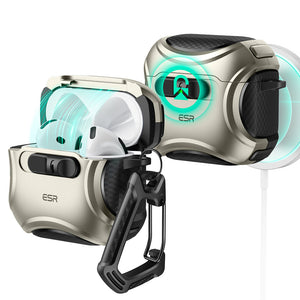
AirPods Pro 3 Pulse Magnetic Lock Case (HaloLock) – $19.99 (With 20% Off Code: BLOG20)

airpods-pro-20222019-pulse-magnetic-lock-case-halolock

This exceptional case doesn’t just safeguard your AirPods Pro against drops; it also provides a shield against water exposure. Crafted with a water-resistant design, it adds an extra layer of protection, ensuring your AirPods remain safe from unexpected encounters with moisture. Here are some of the other features that it offers:

  • Drop-Proof Lid Lock: Engineered with strong magnets boasting 700 g of holding force and an internal latch, this case securely locks your AirPods in place.
  • Slide to Open Mechanism: The smart rubber slide on the front initiates a smart mechanism, reversing the magnet polarity to effortlessly spring open the lid.
  • MagSafe Compatibility: This case allows for swift, convenient wireless charging, enabling you to charge your AirPods Pro without the hassle of removing the protective case.

All in all, the AirPods Pro Pulse Magnetic Lock Case (HaloLock) isn't just a protective cover; it's your AirPods'shield against drops and water exposure, ensuring they remain secure and functional in various environments.

Wrapping Up

Those first moments after an AirPod hits the water set the tone for whether it bounces back or not. If you’ve pulled it out right away, skipped the heat and rice traps, and given it time to dry properly with the openings facing down, you’ve already stacked the odds in your favor. Electronics and moisture don’t mix well, but rushing the recovery often does more harm than good—think warped contacts from forced charging or hidden shorts that surface later.

Watch for the telltale signs that trouble’s brewing down the line: one bud draining faster than the other, faint distortion in calls, or a case that only connects when you nudge things into place. When that starts, no amount of home tweaks will reverse the corrosion inside. That’s your cue to weigh Apple’s repair options against grabbing something tougher for the long haul.

AirPods Pro 3: Built a Little Tougher

A water mishap like this might nudge you toward AirPods Pro 3, which handle splashes and sweat with more confidence than what came before. The earbuds and MagSafe case both hit IP57 for dust and water resistance—good enough for 30 minutes in up to a meter of still water under lab conditions, and reliable for gym sessions, downpours, or the odd sink slip. It’s a step beyond the old limits, where a quick puddle could end things.

Keep It Real Though:

Engineering Hurdle: Hitting IPX5 means surviving lab tests with high-pressure water jets (12.5L/min from 3ft away) – crazy hard for tiny earbuds.

So, no AirPods are waterproof—only “water-resistant,” and that resistance wears off over time.

Bottom Line:Don’t take that as a green light for showers or swims, though. Pressurized streams, pool chemicals, soaps, or prolonged soaking still push past the seals and degrade performance over time. Got them wet anyway? Stick to the basics you’d use here: soft cloth wipe-down, air dry at room temp, and hold off on the case until everything’s bone dry. They’re rugged daily drivers, not dive buddies.

You May aslo like to read:
1、AirPods Pro 3 Rumor: The Ultimate Upgrade You've been Waiting for in 2025!

2、AirPods Guide: Which noise-cancelling AirPods are the best?

3、AirPods Flashing Orange? Why & How to Fix It


Tags: AirPods, AirPods Pro 2025, AirPods Pro
Previous
Download HD iPhone 15 Wallpaper Here
Next
Slight Bend in iPad Pro Still Good? What to Do?

Related Articles

How to Change an Apple Watch Band Safely — No Tools Needed

How to Change an Apple Watch Band Safely — No Tools Needed

choose the right Apple Watch band

How to Choose the Best Apple Watch Band for Your Style and Daily Life

are leather phone cases good,Leather iPhone Case Scratches and Stains

Are Leather Phone Cases Good? The Complete Care & Buying Guide

phone protection for college students with big deal

How To Keep Your Phone Safe at School: What Every Freshman Needs to Know

Leave a Comment

Your email address will not be published.

Recent Post

ESR’s Top 10 Best-Selling Products of 2025
ESR’s Top 10 Best-Selling Products of 2025: Your Buying Guide for 2026
by Carolin on February 08, 2026
esr anti-yellowing clear tpu case line
What is a TPU Phone Case? ESR's Model Tested for Protection & Clarity
by Javeria Salam on November 04, 2025
The best iPad Pro cases of 2025: Expert tested and reviewed
Which iPad Pro 13 Case is good for you : Zugu vs. Moft vs. ESR
by Adam on September 16, 2025
Best Cases for iPhone 17
Best Cases for iPhone 17: Which Wins— OtterBox, ESR, Apple, or Casetify?
by Nicky on September 28, 2025
best 5 magsafe iphone 17 cases
Looking for Custom iPhone Cases for New iPhone - Top 4 Options
by Carolin on September 23, 2025
6-best-iPad-Air-11-inch-Cases-With-Pencil-Holder-in-2025
6 best iPad Air 11-inch Cases With Pencil-Holder in 2025
by Sandy on April 16, 2025

Get 20% off with code: BLOG20

Company

  • About Us
  • Our Blog
  • Newsroom
  • Become a Reseller

Products

  • Designed for MagSafe
  • Protective Phone Cases
  • iPad Cases
  • Screen Protectors
  • Wireless Charging
  • Productivity
  • Magnetic Wallets
  • Other Accessories

Community

  • Affiliate Program

Support

  • Setup Videos & FAQs
  • Return and Refund
  • Warranty Policy
  • Shipping Policy

Get 10% OFF Your First Order

Get insider access to new products and promotions.

Payment options:
  • American Express
  • Apple Pay
  • Google Pay
  • Mastercard
  • PayPal
  • Shop Pay
  • Union Pay
  • Visa
  • Klarna Klarna
  • Afterpay
© 2025 ESR All rights reserved.
  • Terms of Use
  • Privacy Policy
  • Legal Declaration
  • Cookie Policy
  • Shipping Policy
  • Return and Refund
  • Do not sell or share my personal information
  • Search

Shopping Cart

Your cart is currently empty.
Add note for seller
Estimate shipping rates
Add a discount code
Subtotal ¥0.00
View Cart

Thank you for choosing to transfer to a human service.

Sorry! The previous responses were from our AI customer service. Since it didn't satisfy you, you've been transferred to a human agent. We'll reply within 24 hours from Mon to Fri and 48 hours on weekends for further help.

Please select the reason for transfer