We regret to inform you that due to business adjustments, ESR will cease online sales in your area.
Cart 0
  • Designed for MagSafe
    • All MagSafe Products
      • Wireless Charging
      • Car Charger & Mounts
      • Charging Stands
      • MagSafe Cases
      • MagSafe Wallets
      • Power Banks
      • MagSafe Rings & Wall Mounts
      • Best MagSafe Bundles
    • Magsafe in Life
      • Desk Charging
      • Shop Auto
      • Travel Essentials
      • Workspace Power
      • Find My Technology
      • Gift Guide
  • Protection By Device
    • All Cases
      • iPhone
      • iPad🔥
      • Airpods
      • Samsung
    • Screen Protection
      • iPhone
      • iPad🔥
      • Apple Watch & Airtag
      • Samsung
      • For Tesla
    • iPad Productivity
      • Keyboards🔥
      • Styluses
    • Accessories
      • All Accessories
      • iPhone 16
      • iPhone 16e🔥
      • iPhone 16 Pro Max
      • iPhone 16 Pro
      • iPhone 16 Plus
      • iPhone 16
      • iPhone 15
      • iPhone 15 Pro Max
      • iPhone 15 Pro
      • iPhone 15 Plus
      • iPhone 15
      • iPhone 14
      • iPhone 14 Pro Max
      • iPhone 14 Pro
      • iPhone 14 Plus
      • iPhone 14
      • iPhone 13
      • iPhone 13 Pro Max
      • iPhone 13 Pro
      • iPhone 13
      • Other iPhone Series
      • Other iPhone Series
        Choose Your Device
      • iPad 11th Gen (2025)🔥
      • iPad Air 13 (2025)🔥
      • iPad Air 11 (2025)🔥
      •  
      • iPad Pro 13 (2024)
      • iPad Pro 11 (2024)
      • iPad Air 13 (2024)
      • iPad Air 11 (2024)
      • iPad mini 7 (2024)
      •  
      • iPad Pro 12.9 (2022)
      • iPad Pro 11 (2022)
      • iPad Air 5/4 (2022)
      • iPad 10th Gen (2022)
      •  
      • iPad mini 6 (2021)
      • iPad Pro 12.9 (2021)
      • iPad Pro 11 (2021)
      • iPad Pro 11 (2020)
        Choose Your Device
      • AirPods 4
      • AirPods Pro (2023/2022/2019)
      • AirPods 3
        Galaxy S25
      • Galaxy S25 Ultra
      • Galaxy S25+
      • Galaxy S24
      • Galaxy S24 Ultra
      • Galaxy S24+
      • Galaxy S24
      • Galaxy S23
      • Galaxy S23 Ultra
      • Galaxy S23
        iPhone 16
      • iPhone 16e🔥
      • iPhone 16 Pro Max
      • iPhone 16 Pro
      • iPhone 16 Plus
      • iPhone 16
      • iPhone 15
      • iPhone 15 Pro Max
      • iPhone 15 Pro
      • iPhone 15 Plus
      • iPhone 15
      • iPhone 14
      • iPhone 14 Pro Max
      • iPhone 14 Pro
      • iPhone 14 Plus
      • iPhone 14
      • iPhone 13
      • iPhone 13 Pro Max
      • iPhone 13/13 Pro
        Choose Your Device
      • iPad 11th Gen (2025)🔥
      • iPad Air 13 (2025)🔥
      • iPad Air 11 (2025)🔥
      •  
      • iPad Pro 13 (2024)
      • iPad Pro 11 (2024)
      • iPad Air 13 (2024)
      • iPad Air 11 (2024)
      •  
      • iPad Pro 12.9 (6th/5th/4th/3rd Gen)
      • iPad Pro 11 (4th/3rd/2nd/1st Gen)
      • iPad Air 5/4 (2022)
      • iPad 10th Gen (2022)
      •  
         
      • Apple Watch & Airtag
        Galaxy S25
      • Galaxy S25 Ultra
      • Galaxy S24
      • Galaxy S24 Ultra
      • Galaxy S23
      • Galaxy S23 Ultra
      • Galaxy S23+
      • Galaxy S23
      • Galaxy S22
      • Galaxy S22 Ultra
      • Other Samsung Series
      • Galaxy S21+
      • Galaxy S21
         
      • Tesla Tempered-Glass Touchscreen Protector
        Choose Your Device
      • iPad 11th Gen (2025)🔥
      • iPad Air 13 (2025)🔥
      • iPad Air 11 (2025)🔥
      •  
      • iPad Pro 13 (2024)
      • iPad Pro 11 (2024)
      • iPad Air 13 (2024)
      • iPad Air 11 (2024)
      •  
      • iPad Pro 12.9 (6th/5th/4th/3rd)
      • iPad Pro 11 (4th/3rd/2nd/1st)
      • iPad Air 5/4 (2022)
      • iPad 10th Gen (2022)
         
      • Styluses
         
      • Magnetic Wallet
      • MagSafe Rings & Mounts
      • Other Accessories
  • New Arrival
    • iPad 2025 Series
    • iPhone 16e
    • Galaxy S25 Series
    • Protect Your iPhone 16 Camera Control Button
    • 15W Qi2 Wireless Charging
  • Support
    • Product Videos & FAQs
    • General FAQ
  • Explore
    • About Us
    • ESR Blog
    • Newsroom
    • Become a Reseller
My Account
Log in Register
English
  • Designed for MagSafe
    • All MagSafe Products
      • Wireless Charging
      • Car Charger & Mounts
      • Charging Stands
      • MagSafe Cases
      • MagSafe Wallets
      • Power Banks
      • MagSafe Rings & Wall Mounts
      • Best MagSafe Bundles
    • Magsafe in Life
      • Desk Charging
      • Shop Auto
      • Travel Essentials
      • Workspace Power
      • Find My Technology
      • Gift Guide
    • Wireless Charging
      • Portable Charger for Apple Watch - White

      • Qi2 3-in-1 Watch Wireless Charging Set (HaloLock) - Black - US PLUG

      • Magnetic Wireless Car Charger (HaloLock) - Grey

      • Universal Ring 360 (HaloLock) - White-2 Pack

      • All Wireless Charging >
      Charging Stands
      • Qi2 3-in-1 Watch Wireless Charging Set (HaloLock) - Black - EU PLUG

      • CryoBoost™ Pro Bundle (HaloLock) - US Plug

      • MagSafe Charger with CryoBoost Everyday Bundle - EU Plug

      • Magsafe Charger One-Stop Bundle - Black/White

      • All Charging Stands >
      MagSafe Cases
      • iPhone 16 Pro Max Cyber Tough Case with Stash Stand Privacy Protection Bundle - Black

      • iPhone 16 Pro Max HaloLock Classic Hybrid Case (Camera Control) - Clear

      • iPhone 16 Pro Max HaloLock Classic Hybrid Case (Camera Control, Stash Stand) - Clear

      • iPhone 16 Pro Max Zero Clear Case (HaloLock) - Clear

      • All MagSafe Cases >
      MagSafe Wallets
      • Geo Wallet Stand (HaloLock) with Built-in Find My - Midnight Black

      • Geo Wallet Boost (HaloLock) - Grey

      • Magnetic Wallet Boost (HaloLock) - Black

      • Grip Wallet Stand (HaloLock) - Black Carbon Fiber

      • All MagSafe Wallets >
      Power Banks
      • Qi2 MagSlim Kickstand Power Bank (10K) - Black

      • Qi2 MagSlim Power Bank (5K) - Black

      • Qi2 MagSlim Power Bank (10K) - Blue

      • Qi2 5,000 mAh MagSlim Kickstand Power Bank - White

      • All Power Banks >
      MagSafe Rings & Wall Mounts
      • Airplane Phone Holder Mount (HaloLock) - Black

      • Ring Stand (HaloLock) - Sierra Blue

      • Universal Ring (HaloLock) - Black/Silver-4 Pack

      • Universal Ring 360 (HaloLock) - White-2 Pack

      • All MagSafe Rings & Wall Mounts >
      Desk Charging
      • Qi2 mini Kickstand Wireless Charger (HaloLock) - Dark Blue

      • CryoBoost™ Pro Bundle (HaloLock) - US Plug

      • Kickstand MagSafe Compatible Wireless Charger (HaloLock) - Black

      • HaloLock™ 3-in-1 Travel Wireless Charging Set - Black - US Plug

      • All Desk Charging >
      Find My Technology
      • Geo Wallet Stand (HaloLock) with Built-in Find My - Midnight Black

      • Geo Wallet Boost (HaloLock) - Grey

      • Geo Digital Pencil with Built-in Find My - White

      • All Find My Technology >
      Gift Guide
      • Geo Wallet Boost (HaloLock) - Brown

      • Qi2 3-in-1 Travel Wireless Charging Set - White - US Plug

      • Qi2 MagSlim Power Bank (10K) - Blue

      • AirPods 4 Cyber FlickLock Case (HaloLock) - Titanium

      • All Gift Guide >
  • Protection By Device
    • All Cases
      • iPhone
      • iPad🔥
      • Airpods
      • Samsung
    • Screen Protection
      • iPhone
      • iPad🔥
      • Apple Watch & Airtag
      • Samsung
      • For Tesla
    • iPad Productivity
      • Keyboards🔥
      • Styluses
    • Accessories
      • All Accessories
      • iPhone 16
      • iPhone 16e🔥
      • iPhone 16 Pro Max
      • iPhone 16 Pro
      • iPhone 16 Plus
      • iPhone 16
      • iPhone 15
      • iPhone 15 Pro Max
      • iPhone 15 Pro
      • iPhone 15 Plus
      • iPhone 15
      • iPhone 14
      • iPhone 14 Pro Max
      • iPhone 14 Pro
      • iPhone 14 Plus
      • iPhone 14
      • iPhone 13
      • iPhone 13 Pro Max
      • iPhone 13 Pro
      • iPhone 13
      • Other iPhone Series
      • Other iPhone Series
        Choose Your Device
      • iPad 11th Gen (2025)🔥
      • iPad Air 13 (2025)🔥
      • iPad Air 11 (2025)🔥
      •  
      • iPad Pro 13 (2024)
      • iPad Pro 11 (2024)
      • iPad Air 13 (2024)
      • iPad Air 11 (2024)
      • iPad mini 7 (2024)
      •  
      • iPad Pro 12.9 (2022)
      • iPad Pro 11 (2022)
      • iPad Air 5/4 (2022)
      • iPad 10th Gen (2022)
      •  
      • iPad mini 6 (2021)
      • iPad Pro 12.9 (2021)
      • iPad Pro 11 (2021)
      • iPad Pro 11 (2020)
        Choose Your Device
      • AirPods 4
      • AirPods Pro (2023/2022/2019)
      • AirPods 3
        Galaxy S25
      • Galaxy S25 Ultra
      • Galaxy S25+
      • Galaxy S24
      • Galaxy S24 Ultra
      • Galaxy S24+
      • Galaxy S24
      • Galaxy S23
      • Galaxy S23 Ultra
      • Galaxy S23
        iPhone 16
      • iPhone 16e🔥
      • iPhone 16 Pro Max
      • iPhone 16 Pro
      • iPhone 16 Plus
      • iPhone 16
      • iPhone 15
      • iPhone 15 Pro Max
      • iPhone 15 Pro
      • iPhone 15 Plus
      • iPhone 15
      • iPhone 14
      • iPhone 14 Pro Max
      • iPhone 14 Pro
      • iPhone 14 Plus
      • iPhone 14
      • iPhone 13
      • iPhone 13 Pro Max
      • iPhone 13/13 Pro
        Choose Your Device
      • iPad 11th Gen (2025)🔥
      • iPad Air 13 (2025)🔥
      • iPad Air 11 (2025)🔥
      •  
      • iPad Pro 13 (2024)
      • iPad Pro 11 (2024)
      • iPad Air 13 (2024)
      • iPad Air 11 (2024)
      •  
      • iPad Pro 12.9 (6th/5th/4th/3rd Gen)
      • iPad Pro 11 (4th/3rd/2nd/1st Gen)
      • iPad Air 5/4 (2022)
      • iPad 10th Gen (2022)
      •  
         
      • Apple Watch & Airtag
        Galaxy S25
      • Galaxy S25 Ultra
      • Galaxy S24
      • Galaxy S24 Ultra
      • Galaxy S23
      • Galaxy S23 Ultra
      • Galaxy S23+
      • Galaxy S23
      • Galaxy S22
      • Galaxy S22 Ultra
      • Other Samsung Series
      • Galaxy S21+
      • Galaxy S21
         
      • Tesla Tempered-Glass Touchscreen Protector
        Choose Your Device
      • iPad 11th Gen (2025)🔥
      • iPad Air 13 (2025)🔥
      • iPad Air 11 (2025)🔥
      •  
      • iPad Pro 13 (2024)
      • iPad Pro 11 (2024)
      • iPad Air 13 (2024)
      • iPad Air 11 (2024)
      •  
      • iPad Pro 12.9 (6th/5th/4th/3rd)
      • iPad Pro 11 (4th/3rd/2nd/1st)
      • iPad Air 5/4 (2022)
      • iPad 10th Gen (2022)
         
      • Styluses
         
      • Magnetic Wallet
      • MagSafe Rings & Mounts
      • Other Accessories
  • New Arrival
    • iPad 2025 Series
    • iPhone 16e
    • Galaxy S25 Series
    • Protect Your iPhone 16 Camera Control Button
    • 15W Qi2 Wireless Charging
  • Support
    • Product Videos & FAQs
    • General FAQ
  • Explore
    • About Us
    • ESR Blog
    • Newsroom
    • Become a Reseller
Account Cart 0
English

Search our store

Account Cart 0
Popular Searches:
iPad 2025 iPhone 16 camera control Qi2 Wireless Charging Magnetic Wallet
Tips & Guides

What is the iPhone Wallpaper Size? (Included iPhone 17/16/15/14/13/12/11/X/XR Series)

by Carolin on Jun 29, 2021
What Is iPhone Wallpaper Size

If you are looking to add some personality and customization to your device, there’s no better way than through the use of beautiful wallpapers. Setting a wallpaper on your phone is a fun and creative way of showcasing personal style. In this article, you’ll learn about iPhone wallpaper size and how to set up one for different iPhone models.

Find the Right iPhone Wallpaper Dimensions

Whether you consider yourself to be an artistic person or not, wallpaper is a background for your device that is solely meant for you. It’s great when you have the creative freedom to use any background of your choice. Apple makes it easy to use your favorite images as an iPhone background, even photos captured with your excellent iPhone 17 Pro Max camera.

The background image is that on which the device's icons and other control features are placed. Users can set a custom wallpaper for both the lock screen and the home screen, where all of their app icons appear. This extra level of personalization can be a huge difference in a world where millions of people have access to the same smartphones.

However, it's possible that the picture you intend to use doesn't fit the screen of your device perfectly. The picture of your choice has to perfectly fit the screen resolution of the device in question. We've created a tabular guide to show you the different screen resolutions that are available for iPhones.

How to set iPhone wallpaper

Device Name Screen Resolution
iPhone 6 750 x 1334
iPhone 6 Plus 1080 x 1920
iPhone 6s 750 x 1334
iPhone 6s Plus 1080 x 1920
iPhone SE (2016) 640 x 1136
iPhone 7 750 x 1334
iPhone 7 Plus 1080 x 1920
iPhone 8 750 x 1334
iPhone 8 Plus 1080 x 1920
iPhone X 1125 x 2436
iPhone XS 1125 x 2436
iPhone XS Max 1242 x 2688
iPhone XR 828 x 1792
iPhone 11 828 x 1792
iPhone 11 Pro 1125 x 2436
iPhone 11 Pro Max 1242 x 2688
iPhone SE (2020) 750 x 1334
iPhone 12 1170 x 2532
iPhone 12 mini 1125 x 2436
iPhone 12 Pro 1170 x 2532
iPhone 12 Pro Max 1284 x 2778
iPhone 13 mini 1080 x 2340
iPhone 13 1170 x 2532
iPhone 13 Pro 1170 x 2532
iPhone 13 Pro Max 1284 x 2778
iPhone 14 1170 x 2532
iPhone 14 Plus 1284 x 2778
iPhone 14 Pro 1176 x 2556
iPhone 14 Pro Max 1290 x 2796
iPhone 15 1179 x 2556(6.1″ Display)
iPhone 15 Plus 1290 x 2796(6.7″ Display)
iPhone 15 Pro 1179 x 2556(6.1″ Display)
iPhone 15 Pro Max 1290 x 2796(6.7″ Display)
iPhone 16 1179 x 2556(6.1″ Display)
iPhone 16 Plus 1290 x 2796(6.7″ Display)
iPhone 16 Pro 1206 x 2622(6.3″ Display)
iPhone 16 Pro Max 1320 x 2868(6.9″ Display)
iPhone 16e 1170 x 2532(6.1″ Display)
iPhone 17e 1170 x 2532(6.1″ Display)
iPhone 17 1290 x 2796(6.3″ Display)
iPhone 17 Pro 1290 x 2796(6.3″ Display)
iPhone 17 Pro Max 1320 x 2868(6.9″ Display)
iPhone Air 1320 x 2868(6.5″ Display)
  • iphone 14

How to set a wallpaper that fits perfectly on your iPhone background?

Setting a wallpaper that fits the phone background perfectly is a relatively straightforward process. If you have managed to get the right screen resolution, the next thing is to choose a wallpaper and display it in the background. To do this, follow the simple steps outlined below::

  1. Navigate to the settings app on your phone and click on “wallpaper”.
  2. Select “choose a new wallpaper”.
  3. When you get to the “choose” screen, select the image of your choice.
  4. You may zoom in or out by pinching and expanding your fingers on the image. Zoom in or out until you are satisfied with how the image is placed on the screen.
  5. If you are finding it difficult to get the edges of the photo into the background, it’s probably because you have got Perspective Zoom turned on. This means that the phone has to zoom in on the picture and leave some of the edges outside to enable this effect. You can disable the effect by tapping on the feature button at the bottom of the screen.
  6. Tap set and choose if you want the image as the home screen, lock screen or you want it to feature on both of them. You’re done and your favorite image would appear in the background.

How To Size Your Wallpaper With Canva

How To Size Your Wallpaper With Canva?

If the previous process fails, the next step is to use a program like Canva to create a template that fits the image. There are a variety of ways to fix that problem, but for this article, we’ll be dealing with how to fix the problem with Canva.

Canva is a helpful tool that lets iPhone users create personalized wallpapers from scratch by starting a new template or editing existing ones. Users may decide to use the already-existing template to create any wallpaper of their choice. First, you need to download the wallpaper from the App Store to your iPhone. Search for “Canva” and download it on your device.

Additionally, Canva requires that you manually input the aspect ratio for your Apple product. This information is available above, or you could check the official Apple website to find information about a particular product. Input these dimensions to get your black canvas. To input the information on your aspect ratio, do these:

  1. Click custom dimensions. This would give open a dialog box for you to input the personalized specifications for the new design.
  2. Input the screen resolution for your device from the table above
  3. Invert the numbers for the screen resolution to make sure that the smaller number represents the width while the larger number represents the height, for a portrait wallpaper.
  4. Select create

At this stage, you’ll be displayed with a black canvas for you to do your personalization.

Creating the design on the canvas is the fun part of the whole process. Users are free to personalize and add almost anything including images, text, templates, etc. You can make the image complex or simple depending on exactly what you want. You can add elements to your design by clicking the plus (+) icon found in the bottom right corner.

When you are done with your design, make sure to save the image by clicking the download icon found at the top right corner of your screen. This newly designed wallpaper would appear in photos.

Protect Your Personalized iPhone with the Right Case

Even the perfect wallpaper cannot help if a drop ruins your iPhone. A good case protects your device from bumps, slips, and everyday wear. After solving the wallpaper size problem, it makes sense to protect the hardware too, and this is where ESR comes in. ESR creates reliable iPhone cases that combine solid drop protection with slim designs for iPhone 16 and 17 Series phones.

Now, let’s explore the best ESR iPhone cases to match your new wallpaper.

Classic Hybrid Magnetic Case

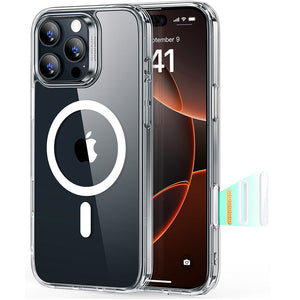
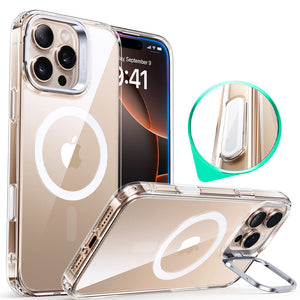
A hard back and flexible edges protect your iPhone from everyday drops, scratches, and corner impacts. Slim, balanced protection keeps your phone comfortable to hold while still guarding the screen and camera. Strong built‑in magnets support stable MagSafe charging and mounts without shifting or unexpected disconnects.

Best iPhone 17e Classic Hybrid Magsafe Case with Stand Clear

Cyber Tough Case

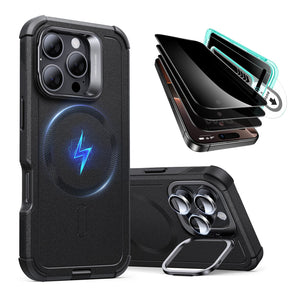
Reinforced layers help protect your iPhone during hard drops, rough handling, and outdoor use. Raised edges and rugged corners reduce the risk of cracked screens and damaged camera bumps. Powerful magnetic alignment keeps MagSafe chargers and stands locked in, even with the thicker protective build.

 iPhone 17 Pro Cyber Tough Magnetic Case (Camera Control, Stash Stand) - Space Gray ESR ESR

Cloud Soft Case

Soft silicone gives a secure, comfortable grip that helps prevent slips while using your phone. Lightweight protection reduces hand strain but still cushions everyday knocks and minor drops. Thin magnetic design keeps MagSafe charging reliable, so your phone stays aligned on chargers and accessories.

iPhone 17 Pro Cloud Soft Silicone Magsfae Case with Stand Light Tan

Conclusion

In summary, this guide explains the ideal iPhone wallpaper sizes and how to make any image fit perfectly. Before setting a wallpaper, consider factors like screen resolution, aspect ratio, and how icons and widgets sit on top. If you want a setup that looks great and stays protected, ESR cases are an excellent match for personalized iPhones.

You May Also Like to Read:

Boost Your Phone's Charging Speed: Quick Tips You Need to Know Now!

Is the iPhone 16e the Most Eye-Safe iPhone Yet? The Surprising Answer!

Save $750 on Your iPhone 16: The Ultimate Case That Protects Your Camera Control Button!

iPhone 17 Colors Explained: A Complete Guide to Every New Shade (2025)

Tags: iPhone, iPhone 17, iPhone 17 Air, iPhone 17 Air Cases, iPhone 17 Pro, iPhone 17 Pro Max, iphone 17e, iphone case, iphone charger, iphone screen protector
Previous
Beats Studio Buds Vs. AirPods Pro: Which is Worth to Buy?
Next
The 10 Best Writing Apps for iPhone (2021)

Related Articles

Why Are There No Outlets in College Classrooms? How Students Can Stay Charged

Why Are There No Outlets in College Classrooms? A Student Guide to Staying Charged

Should You Buy the First iPhone Ultra/Fold — or Wait for Generation Two?

Should You Buy the First iPhone Ultra/Fold — or Wait for Generation Two?

Samsung Wallpaper Size Guide: How to Download, Customize, and Protect Your Perfect Phone Wallpaper

Samsung Wallpaper Size Guide: How to Download, Customize, and Protect Your Perfect Phone Wallpaper

The Complete Director’s Vlogging Kit: Best Smartphone Setups for Every Budget (2026 Guide)

The Complete Director’s Vlogging Kit: Best Smartphone Setups for Every Budget (2026 Guide)

Leave a Comment

Your email address will not be published.

Recent Post

ESR’s Top 10 Best-Selling Products of 2025
ESR’s Top 10 Best-Selling Products of 2025: Your Buying Guide for 2026
by Carolin on February 08, 2026
esr anti-yellowing clear tpu case line
What is a TPU Phone Case? ESR's Model Tested for Protection & Clarity
by Javeria Salam on November 04, 2025
The best iPad Pro cases of 2025: Expert tested and reviewed
Which iPad Pro 13 Case is good for you : Zugu vs. Moft vs. ESR
by Adam on September 16, 2025
Best Cases for iPhone 17
Best Cases for iPhone 17: Which Wins— OtterBox, ESR, Apple, or Casetify?
by Nicky on September 28, 2025
best 5 magsafe iphone 17 cases
Looking for Custom iPhone Cases for New iPhone - Top 4 Options
by Carolin on September 23, 2025
6-best-iPad-Air-11-inch-Cases-With-Pencil-Holder-in-2025
6 best iPad Air 11-inch Cases With Pencil-Holder in 2025
by Sandy on April 16, 2025

Get 20% off with code: BLOG20

Company

  • About Us
  • Our Blog
  • Newsroom
  • Become a Reseller

Products

  • Designed for MagSafe
  • Protective Phone Cases
  • iPad Cases
  • Screen Protectors
  • Wireless Charging
  • Productivity
  • Magnetic Wallets
  • Other Accessories

Community

  • Affiliate Program

Support

  • Setup Videos & FAQs
  • Return and Refund
  • Warranty Policy
  • Shipping Policy

Get 10% OFF Your First Order

Get insider access to new products and promotions.

Payment options:
  • American Express
  • Apple Pay
  • Google Pay
  • Mastercard
  • PayPal
  • Shop Pay
  • Union Pay
  • Visa
  • Klarna Klarna
  • Afterpay
© 2025 ESR All rights reserved.
  • Terms of Use
  • Privacy Policy
  • Legal Declaration
  • Cookie Policy
  • Shipping Policy
  • Return and Refund
  • Do not sell or share my personal information
  • Search

Shopping Cart

Your cart is currently empty.
Add note for seller
Estimate shipping rates
Add a discount code
Subtotal ¥0.00
View Cart

Thank you for choosing to transfer to a human service.

Sorry! The previous responses were from our AI customer service. Since it didn't satisfy you, you've been transferred to a human agent. We'll reply within 24 hours from Mon to Fri and 48 hours on weekends for further help.

Please select the reason for transfer